> ## Documentation Index
> Fetch the complete documentation index at: https://docs.pipevest.com/llms.txt
> Use this file to discover all available pages before exploring further.
# Customers
Creating a customer is the crucial step in enabling global investment access via Pipevest's API.
This document will guide you on how to **create**, **update** and **get** customer details.
## Creating Customers
Make a `POST` request to
[/customers](/api-reference/endpoint/customers/create)
```bash theme={null}
curl --request POST \
--url https://api.pipevest.com/v1/customers\
--header 'Authorization: Bearer 123456' \
--header 'Content-Digest: sha-512=:RK/0qy18MlBSVnWgjwz6lZEWjP/lF5HF9bvEF8FabDg=:' \
--header 'Content-Length: 18' \
--header 'Content-Type: application/json' \
--header 'Signature: sig1=:OTEyMjY4...A5NTNDMEQ=:' \
--header 'Signature-Input: sig1=("Authorization" "Content-Digest" "Content-Length" "Content-Type" "X-Client-Id" "X-Idempotency-Key" "@method" "@target-uri" "@path" "@query");keyid="staging-pipevest-ed25519";created=1732893484;expires=1732893584' \
--header 'X-Client-Id: 123456' \
--header 'X-Idempotency-Key: 123456' \
...
--data '{"firstName": "John", "lastName": "Doe"}'
```
Successfully creating a customer will result in some [side
effects](#creation-side-effects).
#### Reference Id
When creating a user, you can provide an optional `referenceId`. This unique identifier should be used to externally match the customer.
```bash theme={null}
curl --request POST \
--url https://api.pipevest.com/v1/customers\
...
--data '{"firstName": "John", "lastName": "Doe", "referenceId": 123456}'
```
## Updating Customers
If you need to change the customers details, you can simply update their details.
Make a `PUT` request to [/customers](/api-reference/endpoint/customers/update)
```bash theme={null}
curl --request PUT \
--url https://api.pipevest.com/v1/customers\
...
--data '{"customerId": 123456, "firstName": "Dohn", "lastName": "Joe"}'
```
#### Updating Status
A customer by default has an `ACTIVE` status. If you decide to change the customer's status, do keep in mind of the [side
effects](#update-side-effects) of this operation.
```bash theme={null}
curl --request PUT \
--url https://api.pipevest.com/v1/customers\
...
--data '{"customerId": 123456, "status": "CLOSED"}'
```
Successfully updating a customer's status can result in some [side
effects](#update-side-effects).
## Retrieving Customers
When requesting customer details you can do so either by getting:
* A list of customers
* A customer by a given Id
#### List of Customers
Make a `GET` request to [/customers](/api-reference/endpoint/customers/get).
```bash theme={null}
curl --request GET \
--url https://api.pipevest.com/v1/customers\
--header 'Authorization: Bearer 123456' \
--header 'Signature: sig1=:OTEyMjY4...A5NTNDMEQ=:' \
--header 'Signature-Input: sig1=("Authorization" "Content-Digest" "Content-Length" "Content-Type" "X-Client-Id" "X-Idempotency-Key" "@method" "@target-uri" "@path" "@query");keyid="staging-pipevest-ed25519";created=1732893484;expires=1732893584' \
--header 'X-Client-Id: 123456' \
```
This endpoint can be [paginated and sorted](/concepts/pagination).
#### Customer by Id
Make a `GET` request to [/customers/\{customerId}
](/api-reference/endpoint/customers/getById)
```bash theme={null}
curl --request GET \
--url https://api.pipevest.com/v1/customers/123456\
...
```
## Creation Side Effects
When a customer is created, the following resources are also created:
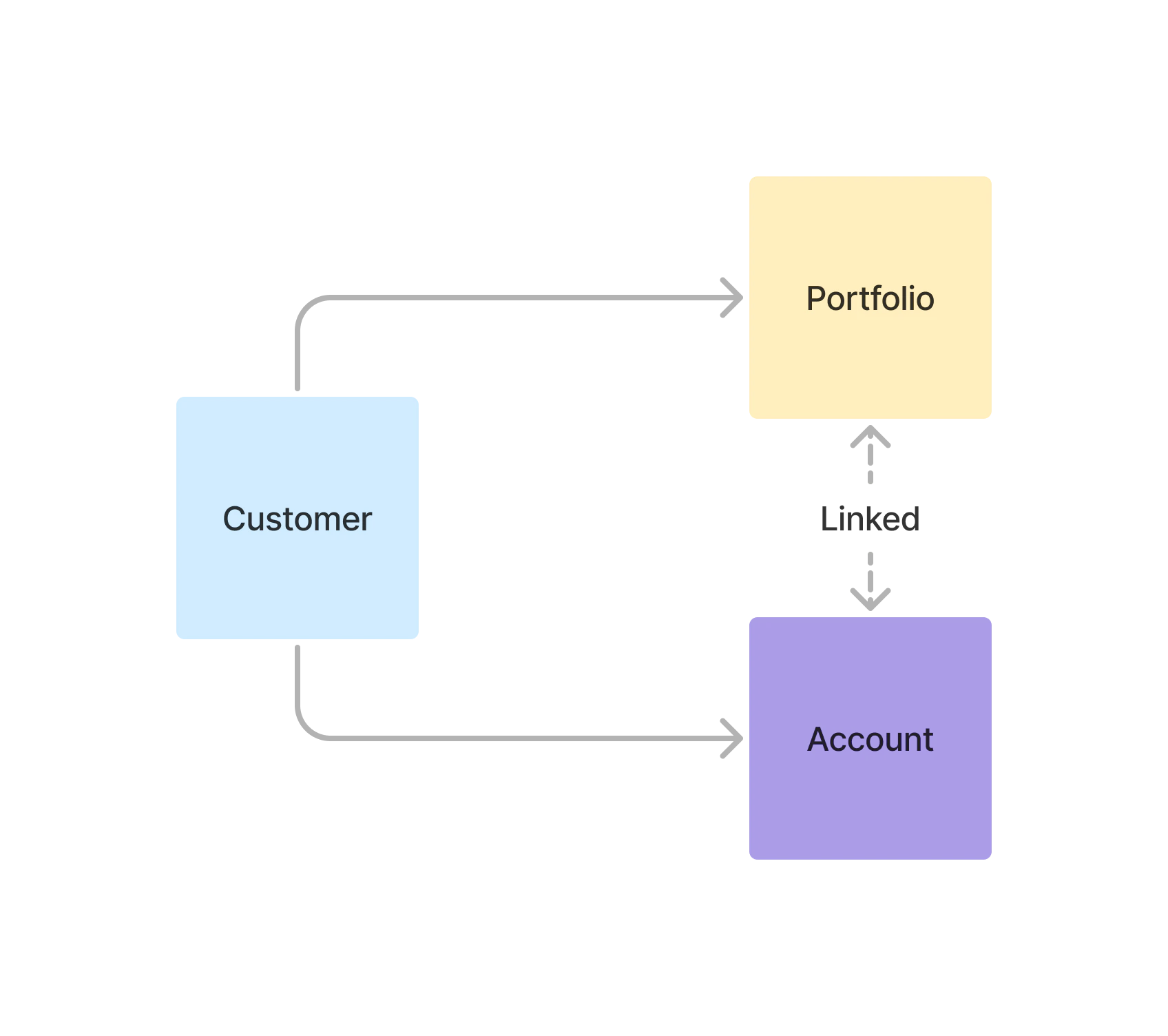
 1. [Account(s)](/guides/accounts) for the customer with the default organizations [Investment Types](/guides/investments#investment-types).
2. A [Portfolio](/guides/portfolios) linked to each account.
## Update Side Effects
When updating a customer's status to `SUSPENDED` or `CLOSED`, the following actions will also take place:
1. [Account(s)](/guides/accounts) status will be updated to match the customer status.
2. [Portfolio(s)](/guides/portfolios) status will be updated to match the customer status.
In the case of updating to `ACTIVE`, you will have to explicitly update the
**Accounts** and **Portfolios**
## Entity Reference
| Property | Definition |
| ------------- | ------------------------------------- |
| `customerId` | Unique customer identifier |
| `firstName` | The customers first name |
| `lastName` | The customers last name |
| `status` | The customers current status |
| `referenceId` | Externally provided unique identifier |
| `createdAt` | Created at unix timestamp |
| `updatedAt` | Updated at unix timestamp |
## Status
| Name | Definition |
| ----------- | ---------------------------------------------------------------- |
| `ACTIVE` | Customer is currently active and able to trade |
| `SUSPENDED` | Customer has been temporarily suspended, and is unable to trade. |
| `CLOSED` | Customer has been permanently blocked from trading |
## Webhook Subscriptions
| Subscription | Definition | Domain |
| ------------------ | ------------------------------------ | --------- |
| `CUSTOMER` | Only events that deal with customers | Customers |
| `CUSTOMER.CREATED` | Triggered when a customer is created | Customers |
| `CUSTOMER.UPDATED` | Triggered when a customer is updated | Customers |
1. [Account(s)](/guides/accounts) for the customer with the default organizations [Investment Types](/guides/investments#investment-types).
2. A [Portfolio](/guides/portfolios) linked to each account.
## Update Side Effects
When updating a customer's status to `SUSPENDED` or `CLOSED`, the following actions will also take place:
1. [Account(s)](/guides/accounts) status will be updated to match the customer status.
2. [Portfolio(s)](/guides/portfolios) status will be updated to match the customer status.
In the case of updating to `ACTIVE`, you will have to explicitly update the
**Accounts** and **Portfolios**
## Entity Reference
| Property | Definition |
| ------------- | ------------------------------------- |
| `customerId` | Unique customer identifier |
| `firstName` | The customers first name |
| `lastName` | The customers last name |
| `status` | The customers current status |
| `referenceId` | Externally provided unique identifier |
| `createdAt` | Created at unix timestamp |
| `updatedAt` | Updated at unix timestamp |
## Status
| Name | Definition |
| ----------- | ---------------------------------------------------------------- |
| `ACTIVE` | Customer is currently active and able to trade |
| `SUSPENDED` | Customer has been temporarily suspended, and is unable to trade. |
| `CLOSED` | Customer has been permanently blocked from trading |
## Webhook Subscriptions
| Subscription | Definition | Domain |
| ------------------ | ------------------------------------ | --------- |
| `CUSTOMER` | Only events that deal with customers | Customers |
| `CUSTOMER.CREATED` | Triggered when a customer is created | Customers |
| `CUSTOMER.UPDATED` | Triggered when a customer is updated | Customers |