> ## Documentation Index
> Fetch the complete documentation index at: https://docs.pipevest.com/llms.txt
> Use this file to discover all available pages before exploring further.
# Pending Requests View
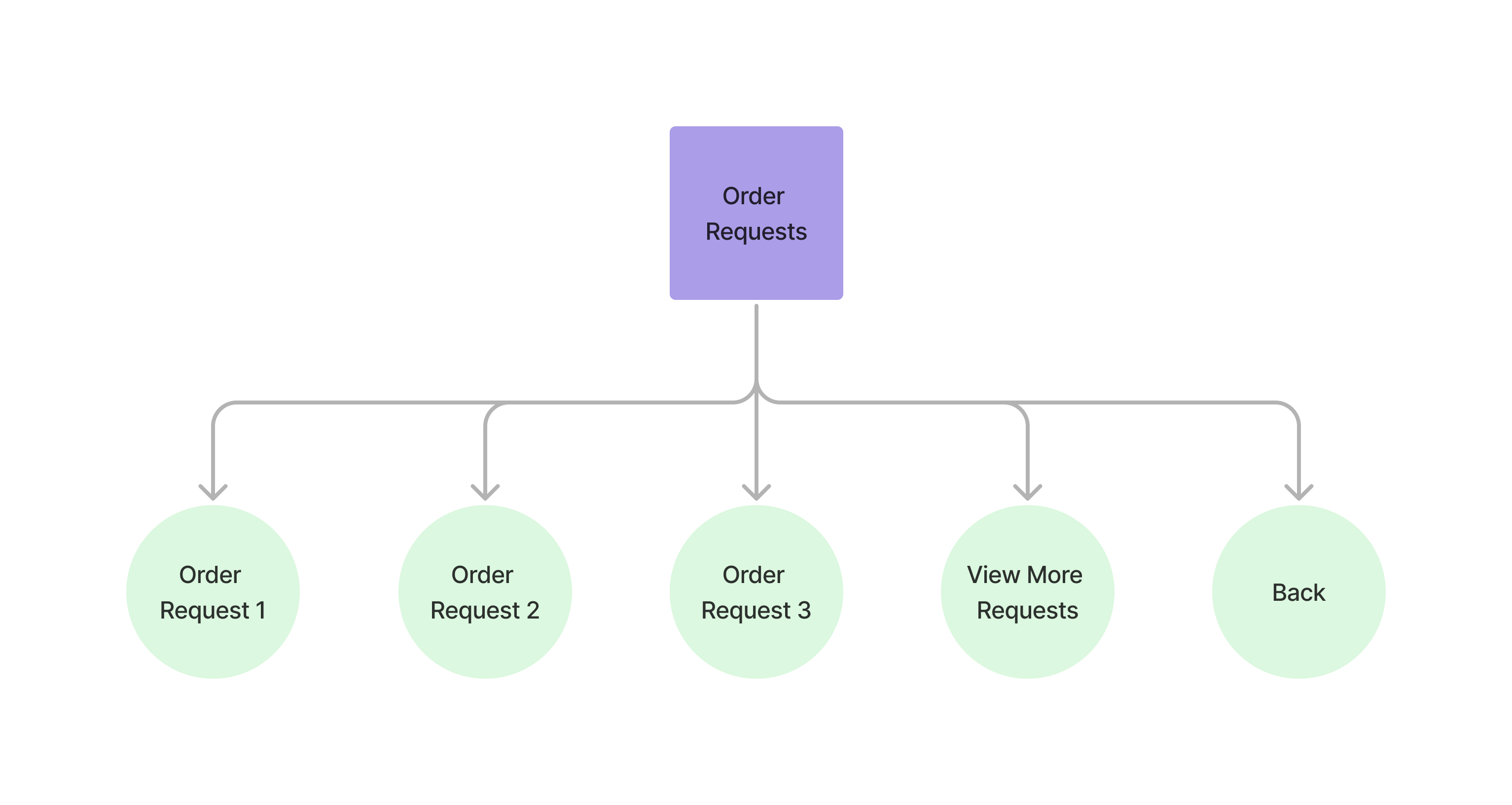
The requests menu view allows users to view the current pending requests.
 ### Accessing the Pending Requests View
This is the menu that is displayed once the customer has chosen to view their pending requests.
From here the customer can choose to view an individual request or go back to the portfolio menu.
```bash theme={null}
curl --request POST \
--url https://api.staging.pipevest.com/v1/ussd/process
...
--data 'sessionId='
--data 'choice=2'
```
**Example Response**
```json theme={null}
{
"message": "USSD request processed successfully",
"data": {
"sessionId": "ussd_2231df057f1f8f5269f0a268249ac104",
"currentState": "PENDING_REQUESTS",
"menu": {
"state": "PENDING_REQUESTS",
"text": "Pending Requests:\n\nSelect a request to view details:\n\n",
"options": [
{
"key": "1",
"label": "SELL: AAPL - ZK281.51",
"nextState": "PENDING_REQUEST_DETAILS",
"data": {
"orderId": "cmhnivxqq0009s60162e8kj64",
"orderType": "SELL",
"symbol": "AAPL",
"amount": 281.51,
"status": "PENDING",
"createdAt": "2025-11-06T14:29:15.027Z"
}
},
{
"key": "2",
"label": "BUY: TSLA - ZK562.00",
"nextState": "PENDING_REQUEST_DETAILS",
"data": {
"orderId": "cmhniqac40007s601oc2xei0v",
"orderType": "BUY",
"symbol": "TSLA",
"amount": 562,
"status": "PENDING",
"createdAt": "2025-11-06T14:24:51.412Z"
}
},
{
"key": "0",
"label": "Back to Portfolio",
"nextState": "MY_PORTFOLIO"
}
],
"isEndState": false
},
"ussdText": "Pending Requests:\n\nSelect a request to view details:\n\n\n\n1. SELL: AAPL - ZK281.51\n2. BUY: TSLA - ZK562.00\n0. Back to Portfolio",
"expiresAt": "2025-11-10T14:56:05.356Z"
}
}
```
#### Paging requests view
```bash theme={null}
curl --request POST \
--url https://api.staging.pipevest.com/v1/ussd/process
...
--data 'sessionId='
--data 'choice=5'
```
Pass `5` as the option key to the `choice` parameter.
#### Individual request view
```bash theme={null}
curl --request POST \
--url https://api.staging.pipevest.com/v1/ussd/process
...
--data 'sessionId='
--data 'choice=1'
```
**Example Response**
```json theme={null}
{
"message": "USSD request processed successfully",
"data": {
"sessionId": "ussd_2231df057f1f8f5269f0a268249ac104",
"currentState": "PENDING_REQUEST_DETAILS",
"menu": {
"state": "PENDING_REQUEST_DETAILS",
"text": "Order Request Details:\n\nType: SELL\nStock: AAPL\nAmount: ZK281.51\nStatus: PENDING\nCreated: 11/6/2025, 2:29:15 PM\n",
"options": [
{
"key": "1",
"label": "Cancel Order",
"nextState": "CANCEL_REQUEST_CONFIRMATION"
},
{
"key": "0",
"label": "Back",
"nextState": "PENDING_REQUESTS"
}
],
"isEndState": false
},
"ussdText": "Order Request Details:\n\nType: SELL\nStock: AAPL\nAmount: ZK281.51\nStatus: PENDING\nCreated: 11/6/2025, 2:29:15 PM\n\n\n1. Cancel Order\n0. Back",
"expiresAt": "2025-11-10T14:56:05.356Z"
}
}
```
### Requests View Example
Check out an example of the ussd requests view
### Accessing the Pending Requests View
This is the menu that is displayed once the customer has chosen to view their pending requests.
From here the customer can choose to view an individual request or go back to the portfolio menu.
```bash theme={null}
curl --request POST \
--url https://api.staging.pipevest.com/v1/ussd/process
...
--data 'sessionId='
--data 'choice=2'
```
**Example Response**
```json theme={null}
{
"message": "USSD request processed successfully",
"data": {
"sessionId": "ussd_2231df057f1f8f5269f0a268249ac104",
"currentState": "PENDING_REQUESTS",
"menu": {
"state": "PENDING_REQUESTS",
"text": "Pending Requests:\n\nSelect a request to view details:\n\n",
"options": [
{
"key": "1",
"label": "SELL: AAPL - ZK281.51",
"nextState": "PENDING_REQUEST_DETAILS",
"data": {
"orderId": "cmhnivxqq0009s60162e8kj64",
"orderType": "SELL",
"symbol": "AAPL",
"amount": 281.51,
"status": "PENDING",
"createdAt": "2025-11-06T14:29:15.027Z"
}
},
{
"key": "2",
"label": "BUY: TSLA - ZK562.00",
"nextState": "PENDING_REQUEST_DETAILS",
"data": {
"orderId": "cmhniqac40007s601oc2xei0v",
"orderType": "BUY",
"symbol": "TSLA",
"amount": 562,
"status": "PENDING",
"createdAt": "2025-11-06T14:24:51.412Z"
}
},
{
"key": "0",
"label": "Back to Portfolio",
"nextState": "MY_PORTFOLIO"
}
],
"isEndState": false
},
"ussdText": "Pending Requests:\n\nSelect a request to view details:\n\n\n\n1. SELL: AAPL - ZK281.51\n2. BUY: TSLA - ZK562.00\n0. Back to Portfolio",
"expiresAt": "2025-11-10T14:56:05.356Z"
}
}
```
#### Paging requests view
```bash theme={null}
curl --request POST \
--url https://api.staging.pipevest.com/v1/ussd/process
...
--data 'sessionId='
--data 'choice=5'
```
Pass `5` as the option key to the `choice` parameter.
#### Individual request view
```bash theme={null}
curl --request POST \
--url https://api.staging.pipevest.com/v1/ussd/process
...
--data 'sessionId='
--data 'choice=1'
```
**Example Response**
```json theme={null}
{
"message": "USSD request processed successfully",
"data": {
"sessionId": "ussd_2231df057f1f8f5269f0a268249ac104",
"currentState": "PENDING_REQUEST_DETAILS",
"menu": {
"state": "PENDING_REQUEST_DETAILS",
"text": "Order Request Details:\n\nType: SELL\nStock: AAPL\nAmount: ZK281.51\nStatus: PENDING\nCreated: 11/6/2025, 2:29:15 PM\n",
"options": [
{
"key": "1",
"label": "Cancel Order",
"nextState": "CANCEL_REQUEST_CONFIRMATION"
},
{
"key": "0",
"label": "Back",
"nextState": "PENDING_REQUESTS"
}
],
"isEndState": false
},
"ussdText": "Order Request Details:\n\nType: SELL\nStock: AAPL\nAmount: ZK281.51\nStatus: PENDING\nCreated: 11/6/2025, 2:29:15 PM\n\n\n1. Cancel Order\n0. Back",
"expiresAt": "2025-11-10T14:56:05.356Z"
}
}
```
### Requests View Example
Check out an example of the ussd requests view